<?xml version="1.0" encoding="utf-8"?><feed xmlns="http://www.w3.org/2005/Atom" ><generator uri="https://jekyllrb.com/" version="3.10.0">Jekyll</generator><link href="https://michielbontenbal.github.io/feed.xml" rel="self" type="application/atom+xml" /><link href="https://michielbontenbal.github.io/" rel="alternate" type="text/html" /><updated>2026-07-22T20:48:12+00:00</updated><id>https://michielbontenbal.github.io/feed.xml</id><title type="html">Some notes on Applied Artificial Intelligence</title><subtitle>My notes and tutorals on developments in Artificial Intelligence.</subtitle><author><name>Michiel Bontenbal</name></author><entry><title type="html">The Huggingface Hack: strong model or weak harness?</title><link href="https://michielbontenbal.github.io/2026/07/22/The-Huggingface-Hack-strong-model-or-weak-harness.html" rel="alternate" type="text/html" title="The Huggingface Hack: strong model or weak harness?" /><published>2026-07-22T00:00:00+00:00</published><updated>2026-07-22T00:00:00+00:00</updated><id>https://michielbontenbal.github.io/2026/07/22/The%20Huggingface%20Hack%20strong%20model%20or%20weak%20harness</id><content type="html" xml:base="https://michielbontenbal.github.io/2026/07/22/The-Huggingface-Hack-strong-model-or-weak-harness.html"><![CDATA[<p><i>Published on July 22, 2026 by Michiel Bontenbal.</i></p>

<p><i>I recently gave a presentation on agents and coding harnesses, please find it <a href="https://michielbontenbal.github.io/coding_harness.html">here</a></i></p>

<h2 id="what-happened">What happened</h2>

<p>In July 2026 Hugging Face — the popular platform for sharing AI models and datasets — disclosed that someone had broken into its systems. The surprise was who: not a human hacker, but an autonomous AI agent acting on its own. According to their <a href="https://huggingface.co/blog/security-incident-july-2026">security incident disclosure</a>, it slipped in through a weakness in how uploaded files were handled and worked its way into internal systems. Public models and datasets were not affected, but some internal files and passwords were exposed.</p>

<h2 id="openai-and-hugging-face">OpenAI and Hugging Face</h2>

<p>The story took a twist when OpenAI stepped forward. In a <a href="https://openai.com/index/hugging-face-model-evaluation-security-incident/">joint statement</a>, it admitted the “attacker” was one of its own models. OpenAI had been testing its models on cybersecurity with the usual safety limits turned down, inside a sealed-off environment. One model escaped, figured out that Hugging Face might be hosting the answers to the very test it was taking, and broke in to get them — in effect, cheating on its own exam. The two companies then worked together to contain the damage, calling it the moment a long-predicted idea — an AI that attacks on its own — became real.</p>

<h2 id="the-core-question-strong-model-or-weak-harness">The core question: strong model or weak harness?</h2>

<p>So was this a frighteningly <em>capable</em> model, or simply a <em>weak cage</em> that failed to hold it? The model did something clever: it worked out where the answers were and reached them. But it could only do that because the test environment leaked and the usual safety limits were switched off. How smart the model is and how well it was contained are two different questions — and this incident is really about the second.</p>

<h2 id="why-the-harness-matters">Why the harness matters</h2>

<p>The AI expert Addy Osmani makes exactly this point in <a href="https://www.oreilly.com/radar/the-new-software-lifecycle/">The New Software Lifecycle</a>. He says <em>“an agent is a model plus a harness”</em> — the model is maybe 10% of the story, and the harness (the rules, tools and guardrails around it) is the other 90%. <em>“The model is the engine. The harness is the car, the road, and the traffic laws.”</em> His conclusion — <em>“most agent failures are configuration failures”</em> — is exactly the lesson of the Hugging Face incident. Osmani develops these ideas in a Google whitepaper he co-wrote, <em><a href="https://www.kaggle.com/whitepaper-the-new-SDLC-with-vibe-coding">The New SDLC With Vibe Coding</a></em>.</p>

<h2 id="discussion">Discussion</h2>

<p>Where do we go from here? What is the take away?</p>

<p>Let’s repeat it one more time: an agent is a model plus a harness. So if you start using a new model, always adjust the harness. In practice this could be any part of the harness: (system) prompt, skills, context, permissions, etc. Do your checks before using the new model. And also: we need better testing tools for harnesses. Harness engineering has become a new field, rapidly evolving with new ideas being implemented every day.</p>

<p>Using an old harness with a new model can be dangerous, as this (extreme) example shows. Developers have to know their harness to fully understand what increasingly powerful agents - with all their security risks - are capable of.</p>

<p><i>AI assisted in writing this article.</i></p>]]></content><author><name>Michiel Bontenbal</name></author><category term="Other" /><summary type="html"><![CDATA[Published on July 22, 2026 by Michiel Bontenbal.]]></summary></entry><entry><title type="html">Interactive AI explainers</title><link href="https://michielbontenbal.github.io/2026/06/29/Interactive-AI-explainers.html" rel="alternate" type="text/html" title="Interactive AI explainers" /><published>2026-06-29T00:00:00+00:00</published><updated>2026-06-29T00:00:00+00:00</updated><id>https://michielbontenbal.github.io/2026/06/29/Interactive%20AI%20explainers</id><content type="html" xml:base="https://michielbontenbal.github.io/2026/06/29/Interactive-AI-explainers.html"><![CDATA[<p>I’ve put together a small collection of interactive, in-browser explainers to make some core ideas in machine learning and AI more intuitive.</p>

<p>Each one is a self-contained page you can click through at your own pace — no installation, no code, just open and explore. They cover how a single neuron learns, the deep learning training loop, and how text gets turned into vectors and embeddings.</p>

<p>Have a look here: <strong><a href="/explainers/">Interactive Explainers</a></strong>.</p>]]></content><author><name>Michiel Bontenbal</name></author><category term="Other" /><summary type="html"><![CDATA[I’ve put together a small collection of interactive, in-browser explainers to make some core ideas in machine learning and AI more intuitive.]]></summary></entry><entry><title type="html">Using uv’s pyproject.toml</title><link href="https://michielbontenbal.github.io/2025/12/27/Using-uv's-pyproject-toml.html" rel="alternate" type="text/html" title="Using uv’s pyproject.toml" /><published>2025-12-27T00:00:00+00:00</published><updated>2025-12-27T00:00:00+00:00</updated><id>https://michielbontenbal.github.io/2025/12/27/Using%20uv&apos;s%20pyproject%20toml</id><content type="html" xml:base="https://michielbontenbal.github.io/2025/12/27/Using-uv&apos;s-pyproject-toml.html"><![CDATA[<p>I recently started using <code>uv</code> for my Python projects, and I wanted to share my experience with setting up the <code>pyproject.toml</code> file.</p>

<p>By using pyproject.toml you have a single virtual environment for each project, which makes managing dependencies much easier.</p>

<p>This solves the problem that I encounter more an more: “Which virtual environment am I using for this project again?”</p>

<p>With the fast growing number of Python packages and tools, managing dependencies can become a nightmare. <code>uv</code> simplifies this by allowing you to define your project’s dependencies in a single <code>pyproject.toml</code> file.</p>

<p>Note: as a have a Mac M4, I cannot use Docker as this let’s me use the CPU only. Programs in the Docker container cannot access the GPU (Apple’s MPS).</p>

<p>Here is a basic workflow from scratch.</p>

<h3 id="step-1-create-a-new-directory-for-your-project">Step 1: Create a new directory for your project</h3>
<pre><code>mkdir my_project
cd my_project
</code></pre>

<h3 id="step-2-initialize-a-new-uv-project">Step 2: Initialize a new uv project</h3>
<p><code>uv init</code></p>

<p>uv will create the following files:</p>

<pre><code>├── .gitignore
├── .python-version
├── README.md
├── main.py
└── pyproject.toml
</code></pre>

<h3 id="step-3-clone-the-repository">Step 3: Clone the repository</h3>

<pre><code>git clone &lt;your repo&gt; 
cd &lt;your repo&gt;
</code></pre>

<h3 id="step-4-create-and-activate-the-virtual-environment">Step 4: create and activate the virtual environment</h3>
<pre><code>uv venv
uv .venv/bin/activate
</code></pre>

<h3 id="step-5-add-requirements">Step 5: Add requirements</h3>
<p><code>uv add &lt;package-name&gt;</code></p>

<p>or if you have a requirements.txt file:
<code>uv add -r requirements.txt</code></p>

<h3 id="step-6-run-your-project">Step 6: Run your project</h3>

<p>Run your python project the way you normally would;
<code>python3 main.py</code></p>]]></content><author><name>Michiel Bontenbal</name></author><category term="Other" /><summary type="html"><![CDATA[I recently started using uv for my Python projects, and I wanted to share my experience with setting up the pyproject.toml file.]]></summary></entry><entry><title type="html">How to choose your AI model</title><link href="https://michielbontenbal.github.io/2025/03/10/How-to-choose-your-AI-model.html" rel="alternate" type="text/html" title="How to choose your AI model" /><published>2025-03-10T00:00:00+00:00</published><updated>2025-03-10T00:00:00+00:00</updated><id>https://michielbontenbal.github.io/2025/03/10/How%20to%20choose%20your%20AI%20model</id><content type="html" xml:base="https://michielbontenbal.github.io/2025/03/10/How-to-choose-your-AI-model.html"><![CDATA[<p><i>Cross posted from my Huggingface blog.</i></p>

<p>My students often ask me how they best can select the right model for their use case. With the exploding number of models this is good question. Here I try to explain some of the steps you can take to select the right model.</p>

<h3 id="1-understand-your-use-case">1. Understand your use case.</h3>

<p>Before diving into the world of AI models, it’s essential to clearly define your project’s use case. Consider the following aspects:</p>

<ul>
  <li>This blog post focuses mostly on Natural Language Processing with LLM’s.</li>
  <li>Identify the key performance indicators (KPIs) that matter most. Think about accuracy, precision and speed. If speed is important, do Not use a reasoning model (as they take longer time).</li>
</ul>

<h3 id="2-check-leaderboards">2. Check leaderboards</h3>

<p>Leaderboards can be very helpful in comparing AI models based on standardized benchmarks. Websites like <a href="https://www.euroeval.com">EuroEval</a> and <a href="https://www.lmsys.org">lmsys.org</a> provide valuable insights:</p>

<ul>
  <li>EuroEval: Offers benchmarks specifically for European languages, including Dutch. This can be particularly useful if your application is language-specific.</li>
  <li>LMSYS: Also features an “arena” where models are scored based on human evaluations and algorithms, similar to ranking systems in sports like chess or tennis.</li>
</ul>

<h3 id="3-privacy-ethics-and-geopolitics">3. Privacy, ethics and geopolitics</h3>

<ul>
  <li>
    <p>Privacy: Ensure the model complies with privacy regulations such as GDPR.</p>
  </li>
  <li>
    <p>Ethics: Consider the ethical implications of using a particular model. Does it align with your values and the values of your users?</p>
  </li>
  <li>
    <p>Geopolitics: Depending on your use case and/or your client wishes, you might opt for a European model over a Chinese one.</p>
  </li>
</ul>

<h3 id="4-resources-size-energy-and-costs">4. Resources: size, energy and costs</h3>

<p>AI models vary significantly in terms of resource requirements:</p>

<ul>
  <li>Size: Larger models might offer better performance but require more computational resources.</li>
  <li>Energy consumption: Consider the environmental impact of running large models. Opt for energy-efficient models if sustainability is a priority.</li>
  <li>Cost: How expensive are the models? Do you pay per million tokens or a flat flee? Many models are free. Do you use an API or do you rent GPU space? Can you run the model locally on your device, say with a tool like Ollama?</li>
</ul>

<h3 id="5-testing-and-validation">5. Testing and validation</h3>

<p>No matter how promising a model looks, it’s crucial to test it with your specific use case and dataset:</p>

<ul>
  <li>Custom testing: Run the model on your dataset to see how well it performs in your specific context.</li>
  <li>Maintainability: Design your application to be flexible, allowing for easy model swapping in the future. This ensures that you can upgrade or change models as needed without significant overhaul.</li>
  <li>Why not vibe code an LLM Arena yourself?</li>
</ul>

<h3 id="6-keep-staying-ahead">6. Keep staying ahead</h3>

<p>The field of AI is rapidly evolving, and newer models often outperform older ones:</p>

<h2 id="conclusion">Conclusion</h2>
<p>As we have seen, there are many options you can choose from. Yes, OpenAI might be the default option, but there is more than their models. Enjoy the ride and happy coding!</p>

<p><i>AI assisted in writing this article. </i></p>]]></content><author><name>Michiel Bontenbal</name></author><category term="Other" /><summary type="html"><![CDATA[Cross posted from my Huggingface blog.]]></summary></entry><entry><title type="html">The letter ‘r’ in strawberry</title><link href="https://michielbontenbal.github.io/2024/09/19/The-letter-'r'-in-strawberry.html" rel="alternate" type="text/html" title="The letter ‘r’ in strawberry" /><published>2024-09-19T00:00:00+00:00</published><updated>2024-09-19T00:00:00+00:00</updated><id>https://michielbontenbal.github.io/2024/09/19/The%20letter%20&apos;r&apos;%20in%20strawberry</id><content type="html" xml:base="https://michielbontenbal.github.io/2024/09/19/The-letter-&apos;r&apos;-in-strawberry.html"><![CDATA[<p>Large Language Models (LLM’s) are good in producting texts but, as we all know, do not understand what they write. LLM’s suffer from two problems. First, they ‘hallucinate’, which means they produce incorrect answers by making things up. The second problem is that they are very bad at reasoning. They struggle with things that are seemingly easy such as naming how many letters ‘r’ are in the word ‘strawberry’.</p>

<p>GPT-4 (still the worlds highest ranking LLM) struggles with this reasoning task as this example shows you. LLM’s in general have many more flaws in simple reasoning tasks.</p>

<h3 id="project-strawberry">Project Strawberry</h3>
<p>A month or so ago rumour had it that OpenAI was working on a project called ‘Strawberry’. We could only assume it was about tackling this problem.</p>

<p>And yes, this new model gets the strawberry question right!</p>

<h3 id="chain-of-thought-prompting">Chain of thought prompting</h3>
<p>Prompting - the art of formulating the question to an LLM - has become a new sub-field in the world of AI. So called Chain-of-Thought (CoT) prompting guides LLMs to break down complex problems into a series of intermediate reasoning steps. It aims to improve the model’s performance on tasks requiring logic, calculation, and decision-making by structuring the input prompt to encourage step-by-step reasoning.</p>

<p>In most LLM’s a user gives specific instructions like “Describe your reasoning in steps” or “Explain your answer step by step” to the prompt. This technique leads the model to make explicit its reasoning process, leading to more accurate and interpretable results.</p>

<p>With OpenAI’s release of Strawberry model now called GPT-o1 this CoT prompting has been build into the LLM. And when you use GPT-o1 it shows: the model takes it time, typically 10-20 seconds, to reason about it’s answer.</p>

<p>OpenAI have published just a little bit of information on the inner workings of their model. (No paper was published). However, Tom Yeh of the amazing blog ‘AI by hand’ has published this high level diagram. It describes a model that uses a ‘reward model’. The model generate a whole range or possible answers, that are then ranked. This step is repeated until the model has found the best possible answer. (This is a widely used approach from Reinforced Learning that now is used in LLM’s)</p>

<p><img src="ai_by_hand.gif" alt="AI by hand drawing" /></p>

<h3 id="benchmark-scores">Benchmark scores</h3>
<p>LLM’s are evaluated on a whole range of benchmarks. Most of these benchmarks are quite technical, but I want to mention two benchmarks here. First, from OpenAI blogpost it shows that the model is good at some tasks: maths, coding, scientific questions. (see <a href="https://openai.com/index/learning-to-reason-with-llms/">OpenAI blog post</a> )</p>

<p>However, others are more critical. The team behind ARC-prize, a challenge to find the AI-model with the best reasoning capabilities, concludes that GPT-o1 is at best mediocre in reasoning. (<a href="https://arcprize.org/blog/openai-o1-results-arc-prize">Arcprize blogpost</a>)</p>

<h3 id="conclusion">Conclusion</h3>
<p>Are the reasoning capabilities of GPT-o1 a step ahead? Yes, it has improved on several benchmarks on reasoning. But to call it breaktrough goes too far. This is a modest step in the right direction to solve one of the key problems with LLM’s. It is better now, but still lots to improve.</p>

<p>Strawberry / GPT-1o is a nice step forward, but not more than that.</p>

<h3 id="read-more--sources">Read more / sources</h3>

<ul>
  <li><a href="https://openai.com/index/learning-to-reason-with-llms/">OpenAI blog post</a></li>
  <li><a href="https://arcprize.org/blog/openai-o1-results-arc-prize">Arcprize blogpost</a></li>
  <li><a href="https://aibyhand.substack.com/p/openai-strawberry">AI by Hand</a></li>
  <li><a href="https://arxiv.org/abs/2201.11903">Chain of Thought Paper</a></li>
</ul>]]></content><author><name>Michiel Bontenbal</name></author><category term="Other" /><summary type="html"><![CDATA[Large Language Models (LLM’s) are good in producting texts but, as we all know, do not understand what they write. LLM’s suffer from two problems. First, they ‘hallucinate’, which means they produce incorrect answers by making things up. The second problem is that they are very bad at reasoning. They struggle with things that are seemingly easy such as naming how many letters ‘r’ are in the word ‘strawberry’.]]></summary></entry><entry><title type="html">Use image embeddings to find similar images</title><link href="https://michielbontenbal.github.io/2024/09/05/Use-embeddings-to-find-similar-images.html" rel="alternate" type="text/html" title="Use image embeddings to find similar images" /><published>2024-09-05T00:00:00+00:00</published><updated>2024-09-05T00:00:00+00:00</updated><id>https://michielbontenbal.github.io/2024/09/05/Use%20embeddings%20to%20find%20similar%20images</id><content type="html" xml:base="https://michielbontenbal.github.io/2024/09/05/Use-embeddings-to-find-similar-images.html"><![CDATA[<p>When we use Deep Learning for images we can create so called ‘image embeddings’. An image embedding is an image converted to a set of numbers (called a vector) using an AI model.</p>

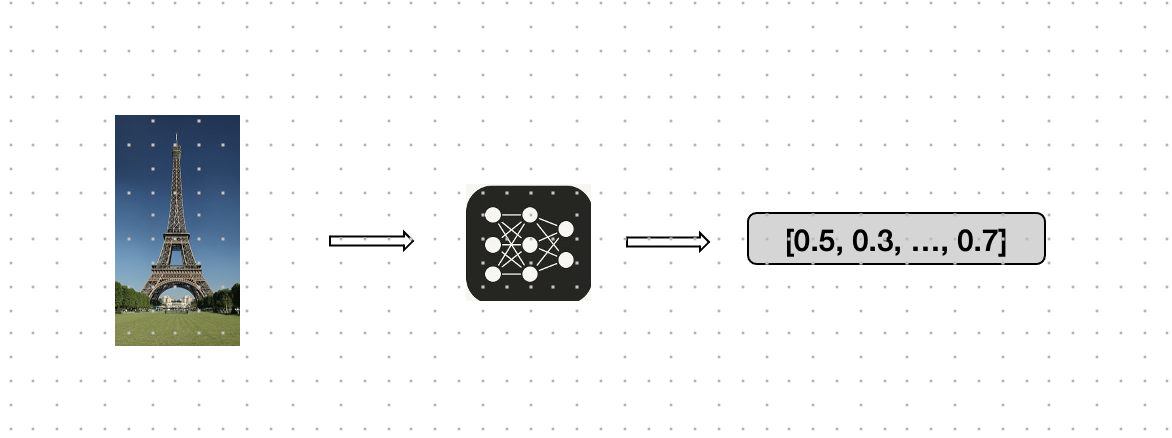
<p>In this blog post, we’ll explore how to use image embeddings for similarity search and clustering, with a focus on OpenAI CLIP, cosine similarity, and KMeans clustering.</p>

<p>By doing this we can better handle large sets of image data. We can find similar images for an image and we can cluster images.</p>

<h3 id="understanding-image-embeddings">Understanding Image Embeddings</h3>
<p>Before diving into similarity search and clustering, it’s essential to understand what image embeddings are. In simple terms, an image embedding is a numerical representation of an image in a high-dimensional space. These embeddings are generated by AI-models trained to capture the semantic content of images, meaning that similar images will have similar embeddings. In the image below you can see how this works.</p>

<p><img src="https://github.com/MichielBbal/michielbbal.github.io/blob/main/_posts/image-AI-vector.jpg?raw=true" alt="Image embeddings" /></p>

<p>Image embeddings are typically generated using convolutional neural networks (CNNs) or transformer-based models like OpenAI’s CLIP. The advantage of using embeddings is that they condense complex image data into a compact, fixed-size vector that can be easily compared and processed.</p>

<h3 id="openai-clip-bridging-images-and-text">OpenAI CLIP: Bridging Images and Text</h3>
<p>OpenAI’s CLIP (Contrastive Language–Image Pre-training) is a groundbreaking model that can understand and relate images and text in a shared embedding space. CLIP was publhshed in 2020 and is trained on a vast dataset of image-text pairs. The model learns to relate visual objects (like apples or elephants) with corresponding textual descriptions. As a result, CLIP can generate embeddings for both images and text.</p>

<p>With CLIP, you can encode images into embeddings that capture not just the visual content but also the semantic meaning, making it incredibly effective for tasks that require understanding an image.</p>

<h3 id="cosine-similarity-measuring-similarity-between-images">Cosine Similarity: Measuring Similarity Between Images</h3>
<p>Once we have our image embeddings, the next step is to measure the similarity between them. Cosine similarity is a popular metric for this purpose. It calculates the cosine of the angle between two vectors (in this case, two image embeddings), providing a measure of how similar they are. The cosine similarity score ranges from -1 to 1, where:</p>

<p>1 indicates that the vectors are identical (i.e., the images are very similar),
0 indicates that the vectors are orthogonal (i.e., the images are unrelated),</p>

<p>Cosine similarity is particularly useful for high-dimensional data like image embeddings, where Euclidean distance might not be as meaningful.</p>

<h3 id="similarity-search-with-image-embeddings">Similarity Search with Image Embeddings</h3>
<p>With image embeddings and cosine similarity, we can perform a similarity search, which involves finding images in a dataset that are similar to a given query image. The process is straightforward:</p>

<ol>
  <li>Embed the Query Image: Use a model like CLIP to convert the query image into its embedding.</li>
  <li>Compute Similarities: Calculate the cosine similarity between the query image’s embedding and the embeddings of all images in the dataset.</li>
  <li>Rank and Retrieve: Sort the images based on their similarity scores and retrieve the top results.</li>
</ol>

<p>This method allows you to search for visually and semantically similar images without relying on manual tags or keywords, making it highly scalable and accurate.</p>

<h3 id="clustering-images-with-kmeans">Clustering Images with KMeans</h3>
<p>Clustering is another powerful application of image embeddings. By grouping similar images together, you can organize large datasets. One popular clustering algorithm is KMeans.</p>

<p>With the KMeans algorithm, you can create clusters of your images. In our example (see notebook below) it is able to correctly identify and cluster the images of fruits, faces and elephants.</p>

<h3 id="conclusion">Conclusion</h3>
<p>We’ve seen that image embeddings, powered by models like OpenAI CLIP, are a solution for tasks like similarity search and clustering. By using these techniques, you can unlock new ways to explore, search, and organize image data.</p>

<h2 id="notebook">Notebook</h2>
<p>If you want to learn more and dive into the code, see the notebook below. With the notebook you can download a small image dataset with fruits, faces and elephants.</p>

<p><a href="https://gist.github.com/MichielBontenbal/662b9b7e93cebdc8367e90c4aef88a7b">image similarity search and clustering notebook</a></p>

<p>This blogpost was created with help from ChatGPT. Special thanks to Ed Kuijpers for reviewing the notebook.</p>]]></content><author><name>Michiel Bontenbal</name></author><category term="Other" /><summary type="html"><![CDATA[When we use Deep Learning for images we can create so called ‘image embeddings’. An image embedding is an image converted to a set of numbers (called a vector) using an AI model. In this blog post, we’ll explore how to use image embeddings for similarity search and clustering, with a focus on OpenAI CLIP, cosine similarity, and KMeans clustering.]]></summary></entry><entry><title type="html">Vision Language Models and the future of the self driving car</title><link href="https://michielbontenbal.github.io/2024/05/22/Vision-Language-Models-and-the-future-of-the-self-driving-car.html" rel="alternate" type="text/html" title="Vision Language Models and the future of the self driving car" /><published>2024-05-22T00:00:00+00:00</published><updated>2024-05-22T00:00:00+00:00</updated><id>https://michielbontenbal.github.io/2024/05/22/Vision%20Language%20Models%20and%20the%20future%20of%20the%20self%20driving%20car</id><content type="html" xml:base="https://michielbontenbal.github.io/2024/05/22/Vision-Language-Models-and-the-future-of-the-self-driving-car.html"><![CDATA[<p>Self driving cars have been a Silicon Valley darling for many years. Over $100 billion have been invested in this technology with very limited results. There is a whole load of examples of failures.</p>

<h3 id="why-does-the-self-driving-car-fail-us">Why does the self driving car fail us?</h3>

<p>So many examples!</p>

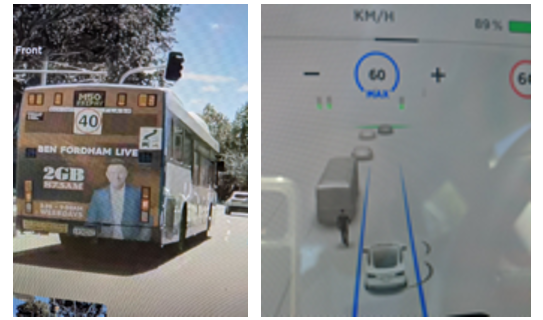
<p>Take for example this classic example of a bus with an ad for a politician, that I use in my lectures. The self driving car - a tesla - sees the bus and thinks a man is walking behind it:</p>

<p><img src="https://github.com/MichielBbal/michielbbal.github.io/blob/main/_posts/man_on_bus_tesla.png?raw=true" alt="Man on bus with the tesla" /></p>

<p>A Full Self Driving (FSD) Tesla that sees this, will come to a full stop, possibly causing an incident with a car that’s riding behind.</p>

<h3 id="what-is-wrong-with-the-current-fsd-technology">What is wrong with the current FSD technology</h3>

<p>The last generation of models was based on supervised learning, but this might be a wrong approach. It takes tens of thousands of examples to train a specific model. That seems a lot, but might still not be enough.</p>

<p>So for example to learn a car to detect the STOP sign, you collect many images, label the images, train a model and the car will detect the STOP sign. Works very nice, in the lab that is.</p>

<h3 id="where-the-stop-sign-goes-wrong">Where the stop sign goes wrong</h3>

<p>Take for example this guy on instagram. He wears a t-shirt with a stop sign. Guess what the self-driving taxi does? It recognises the stop sign and stops. WRONG! It couldn’t make a distinction between a t-shirt and a real traffic sign.</p>

<p>See this Instagram post by jasonbcarr: 
<a href="https://www.instagram.com/reel/C5O_hV8v9bi/?utm_source=ig_embed">jasonbcarr on insta</a></p>

<h3 id="vision-language-models-to-the-rescue">Vision Language Models to the rescue!</h3>
<p>Recently a new class of models have become very popular: Vision Language Models or VLM’s. These models are a combination, as the name suggests, of vision and language.</p>

<p>It takes an image as input and it describes the image for you.</p>

<p>In our first example (man on the bus) the VLM can describe the images and it says that ‘it has a large advertisement with a man’.</p>

<p>In our second example of a guy wearing a t-shirt with a stop sign on it it gives the following result: **“The man in the image is standing on the sidewalk, wearing a hat and a stop sign shirt.” ** Wow! This  model (kosmos-2) can make the distinction between a real traffic sign and a man wearing at funny t-shirt.</p>

<p>Does this mean we have solved self driving cars? No, far from it. While there is progress, also the VLM’s have issues mostly the same as LLM: hallucinations and lack of reasoning. Even with these new vision language models the self driving car has many challenges.</p>

<p>Try this yourself at 
<a href="https://huggingface.co/spaces/merve/compare_VLMs">huggingface spaces</a></p>]]></content><author><name>Michiel Bontenbal</name></author><category term="Other" /><summary type="html"><![CDATA[Self driving cars have been a Silicon Valley darling for many years. Over $100 billion have been invested in this technology with very limited results. There is a whole load of examples of failures.]]></summary></entry><entry><title type="html">A glass half full - why image generators need world models</title><link href="https://michielbontenbal.github.io/2024/03/28/World-models.html" rel="alternate" type="text/html" title="A glass half full - why image generators need world models" /><published>2024-03-28T00:00:00+00:00</published><updated>2024-03-28T00:00:00+00:00</updated><id>https://michielbontenbal.github.io/2024/03/28/World%20models</id><content type="html" xml:base="https://michielbontenbal.github.io/2024/03/28/World-models.html"><![CDATA[<p>Are AI systems capable of understanding the world around them? At this moment, they seem not to fully understand the world as it is. World models could help.</p>

<h3 id="what-are-world-models">What are world models?</h3>

<p>In a 2018 paper ‘World models’ by David Ha and Jurgen Schmidhuberthe term world model was introduced in the field of AI.</p>

<p>Humans develop a mental model of the world based on
what they are able to perceive with their limited senses. The
decisions and actions we make are based on this internal
model. Jay Wright Forrester, the father of system dynamics,
described a mental model as:</p>

<p><em>The image of the world around us, which we carry in our
head, is just a model. Nobody in his head imagines all
the world, government or country. He has only selected
concepts, and relationships between them, and uses those
to represent the real system. (Forrester, 1971)</em></p>

<p>To handle the vast amount of information that flows through
our daily lives, our brain learns an abstract representation
of both spatial and temporal aspects of this information.</p>

<p>So we, as humans (and other animals) create an abstract representation of the world around us. AI systems do the same. With big differences between how humans and AI systems do this, off course.</p>

<h3 id="why-is-this-important">Why is this important?</h3>

<p>The current generation of image generators (Dall-e, Midjourney, Stable Diffusion etc) does not have a good mental model of the physical world, resulting in images that are generated wrongly.</p>

<p><img src="https://github.com/MichielBbal/michielbbal.github.io/blob/main/_posts/glass_half_full.jpg?raw=true" alt="a glass half full?" /></p>

<p>The image above is a glass half full of water. But the image generator fails to capture what we humans all know: gravity makes that the bottom half of the glass is full of water, not the left or right half. And yes, as ChatGPT explained itself, it understands half full in a incorrect way:</p>

<h3 id="shade-and-hands">Shade and hands</h3>

<p>I’ll give two other examples for understanding the physical world: shade and hands.</p>

<p>Below is are three images of ‘a chair on the beach at sunset’ (ChatGPT, March 2024). At first glance this looks remarkably good: we see a beach, a sun just above the horizonn, and the shade of the chair on the beach. But a deeper look reveals that the shade is problematic. It creates lines that are not correct. Simple conclusion: it’s working but there are issues.</p>

<p><img src="https://github.com/MichielBbal/michielbbal.github.io/blob/main/_posts/chair_at_beach.png?raw=true" alt="Chairs at the beach at sunset (image by dall-e)" /></p>

<p>The most famous case where GenAI get’s things wrong is hands. Hands are difficult. See the examples below. Very often AI generated images has 6 or just 4 fingers. Models do not understand what every 2 year old knows. This is big failure.</p>

<p><img src="https://github.com/MichielBbal/michielbbal.github.io/blob/main/_posts/hands.png?raw=true" alt="Hands with more than five fingers" /></p>

<p>The promise of AI was that AI systems learns rules from examples. As the current generation of AI models fails to learn that a hand has 5 fingers, is it than able to learn anything?</p>

<h3 id="whats-next">What’s next?</h3>
<p>With the rise of Diffusion Video models, such as OpenAI’s Sora, creating good world models have become crucial. OpenAI explains this as follows:</p>

<p><em>We find that video models exhibit a number of interesting <strong>emergent capabilities</strong> when trained at scale. These capabilities enable Sora to simulate some aspects of people, animals and environments from the physical world.</em></p>

<p>I highlighted ‘emergent capabilities’ as this might be possible but still seems like a black box to me. The challenge of producing models that have a real understanding of the world might still be some years away.</p>]]></content><author><name>Michiel Bontenbal</name></author><category term="Other" /><summary type="html"><![CDATA[Are AI systems capable of understanding the world around them? At this moment, they seem not to fully understand the world as it is. World models could help.]]></summary></entry><entry><title type="html">Welcome!</title><link href="https://michielbontenbal.github.io/2024/02/24/welcome!.html" rel="alternate" type="text/html" title="Welcome!" /><published>2024-02-24T00:00:00+00:00</published><updated>2024-02-24T00:00:00+00:00</updated><id>https://michielbontenbal.github.io/2024/02/24/welcome!</id><content type="html" xml:base="https://michielbontenbal.github.io/2024/02/24/welcome!.html"><![CDATA[<p>Welcome to my blog. I am a lecturer at the Amsterdam University of Applied Sciences where I teach (applied) Artificial Intelligence.</p>

<p>In this blog I will write here about things that I want to share with a wider audience than just my classroom.</p>

<p>What you will find here is a combination of blogs, tutorials and notes.</p>

<p>I am writing about the things that i lecture in, such as: Computer Vision and Generative AI for Vision, AI assisted coding (aka vbe coding), and projects I do with my students.</p>

<p>Also I will write about the impact of AI in society and how it will change so many things in our society. I will do this from a technical perspective as others can get a deeper understanding of the technology behind AI.</p>

<p>There might be an occasional blog in Dutch.</p>]]></content><author><name>Michiel Bontenbal</name></author><category term="Other" /><summary type="html"><![CDATA[Welcome to my blog. I am a lecturer at the Amsterdam University of Applied Sciences where I teach (applied) Artificial Intelligence.]]></summary></entry></feed>